Client Onboarding Automation

End-to-End Client Welcome System. A webhook-triggered n8n workflow that automatically captures new client submissions, sends personalized welcome emails, generates custom onboarding checklists, and notifies the business owner — all powered by AI.
n8n Webhook AI Gmail
Client Onboarding Automation Workflow
6
Workflow Steps
🔗
Webhook Triggered
AI
Powered
Auto
Notify

Key Features

A complete end-to-end client onboarding system powered by AI automation and webhook triggers

🔗

Webhook Trigger

Fires automatically on new client form submission. No manual intervention needed — the workflow starts the moment a client signs up.

💾

Client Storage

Saves all client details to Google Sheets for centralized record-keeping. Build your client database automatically with every submission.

🤖

AI Welcome Draft

Creates a personalized welcome email draft using AI. Each email is tailored to the client's specific needs and submission details.

📧

Auto Welcome Email

Sends the AI-crafted welcome email automatically via Gmail. Clients receive a professional, personalized response within seconds.

AI Checklist

Generates a custom onboarding checklist based on the client's profile. Ensures every client gets a tailored onboarding experience.

🔔

Owner Notification

Alerts the business owner with full client details via email. Stay informed about every new client without checking dashboards.

Tech Stack

Built with n8n automation, webhook integrations, AI language models, and Google Workspace

n8n
Workflow automation platform orchestrating the full onboarding pipeline
Webhooks
Instant trigger on client form submission for real-time processing
AI/LLM
Personalized welcome emails and onboarding checklist generation
Google Sheets
Client data storage for centralized record management
Gmail
Automated welcome emails and owner notifications
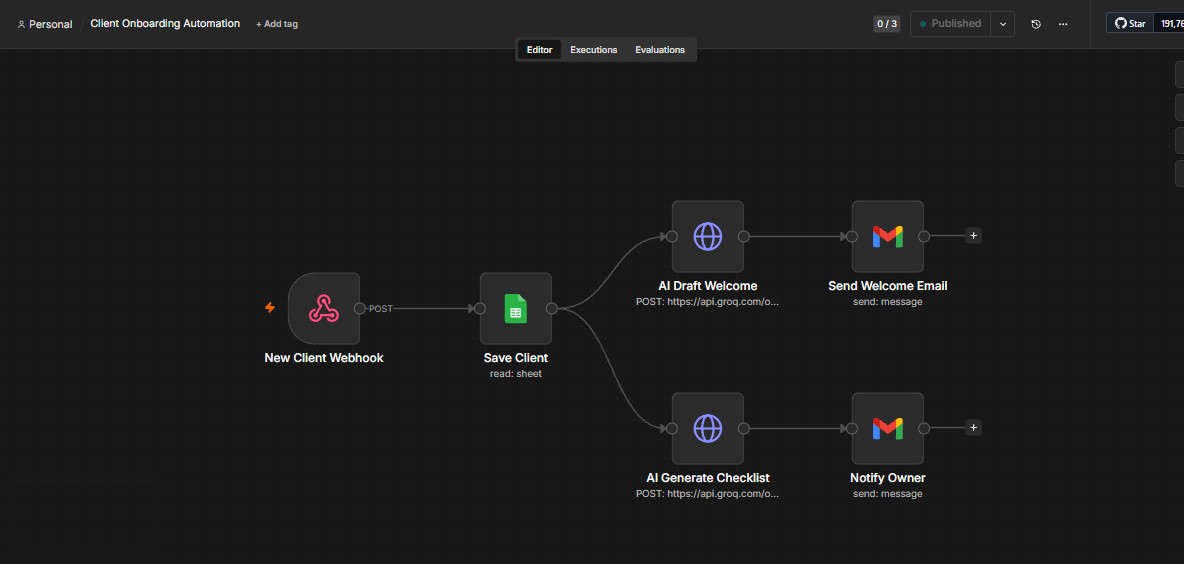
// n8n Workflow Pipeline 1. Webhook → Client submits form 2. Google Sheets → Save client data 3. AI Agent → Draft welcome email 4. Gmail → Send welcome email 5. AI Agent → Generate checklist 6. Gmail → Notify business owner

How It Works

Automated four-phase process from client submission to complete onboarding setup

1

Client Submits

A new client fills out your onboarding form. The webhook instantly captures the submission and triggers the workflow.

2

Save & Draft

Client details are saved to Google Sheets while AI simultaneously drafts a personalized welcome email based on their submission.

3

Send Welcome

The AI-crafted welcome email is sent automatically via Gmail, giving your client an immediate professional first impression.

4

Generate Checklist

AI creates a custom onboarding checklist and the business owner is notified with all client details for a smooth handoff.

Ready to Automate Onboarding?

Get in touch to build a custom client onboarding workflow that saves hours every week