Invoice Reminder Bot
Automated overdue invoice follow-up powered by n8n and AI. Reads your Google Sheet of invoices, identifies past-due accounts, drafts personalized reminder emails, and sends them automatically every week.
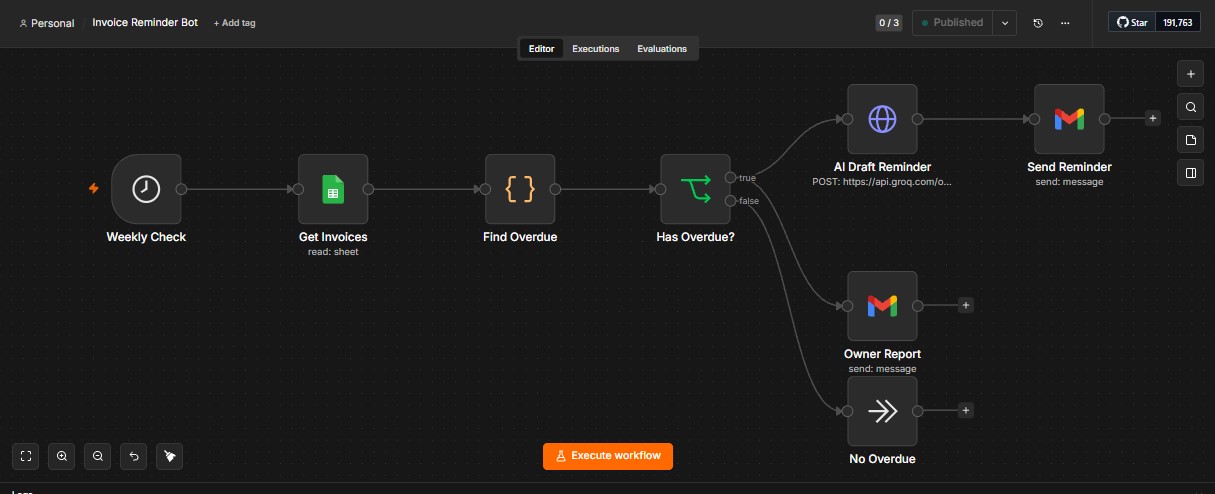
Automated overdue invoice follow-up powered by n8n and AI. Reads your Google Sheet of invoices, identifies past-due accounts, drafts personalized reminder emails, and sends them automatically every week.
A complete automated pipeline from invoice tracking to personalized email reminders
Triggers every week automatically — no manual intervention needed. The workflow runs on a reliable schedule so you never miss a follow-up.
Pulls invoice data directly from your Google Sheet. Reads client names, amounts, due dates, and contact info in real time.
Intelligently identifies past-due invoices by comparing due dates to today. Only overdue accounts enter the reminder pipeline.
Creates personalized follow-up emails tailored to each client. AI considers invoice amount, days overdue, and client history.
Sends reminders directly via Gmail integration. Professional, personalized emails go out without any manual clicks.
Weekly summary of overdue activity sent to you. Know exactly which invoices were followed up and their current status.
Built with n8n and integrated services for a seamless automation pipeline
Four-step automated pipeline from trigger to delivery
The workflow fires automatically every week on a set schedule.
Reads all invoices from your connected Google Sheet.
Filters for past-due invoices and AI drafts personalized reminders.
Sends reminder emails via Gmail and delivers a summary report.
Let automation handle your overdue follow-ups so you can focus on growing your business.